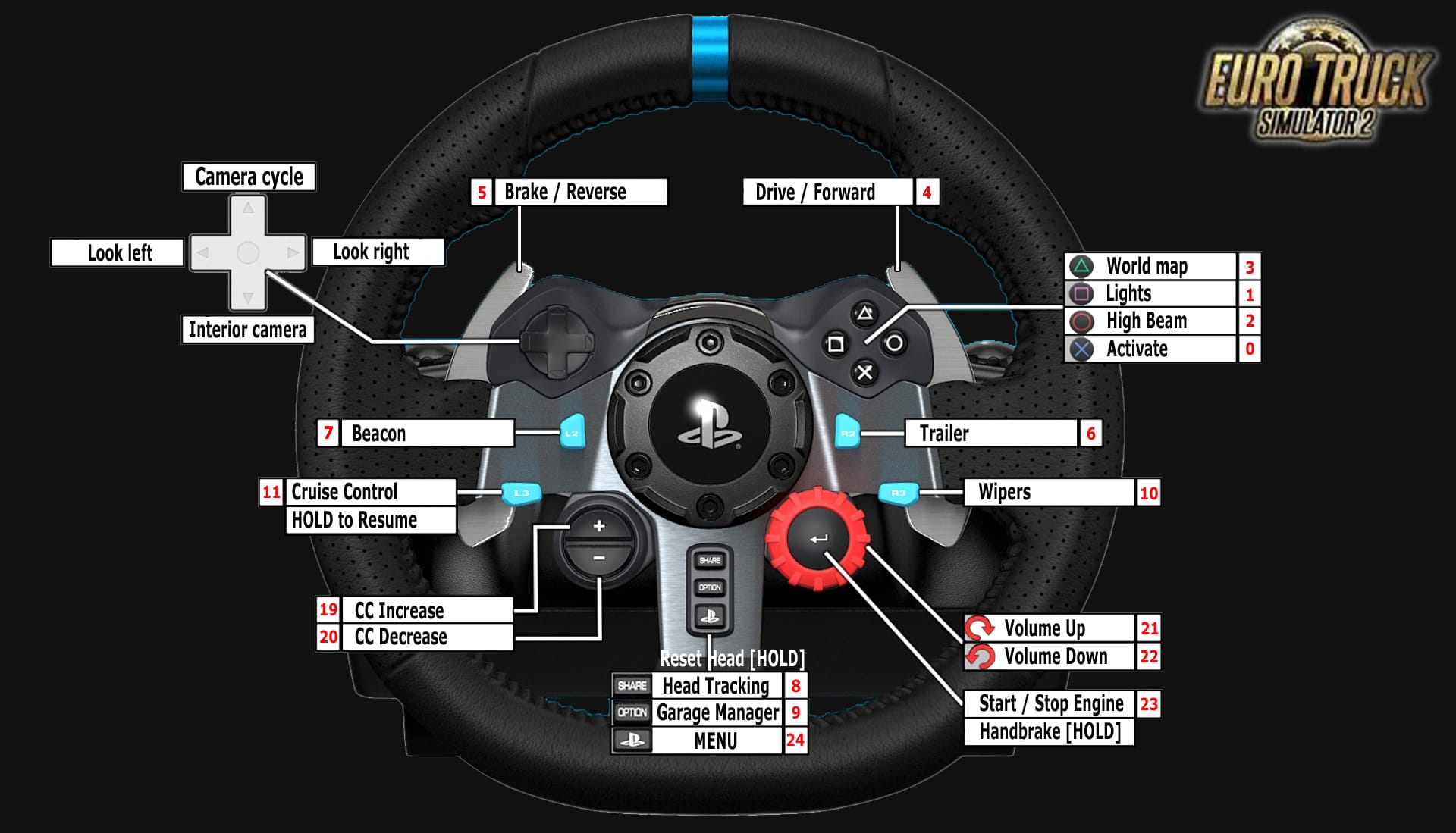
For optimal use of the Logitech G29 in Euro Truck Simulator 2, it is recommended to configure all core driving functions directly within the game. This includes steering, accelerator, brake, clutch, and gear shifting. Handling these fundamentals in ETS2 ensures accurate input recognition and consistent force feedback behavior.
For more advanced and secondary controls, Logitech G Hub (or Logitech Gaming Software for older systems) should be used. This software allows you to assign complex and contextual commands to the wheel’s buttons and D-pad, significantly expanding functionality without relying on the keyboard. Common examples include indicators, headlights, windshield wipers, cruise control, and profile switching. Using press-and-hold or modifier-based bindings enables multiple actions to be mapped to the same physical button, keeping the control layout efficient and uncluttered.
Many experienced users also map frequently accessed simulation features to the wheel’s auxiliary buttons. Typical bindings include trailer coupling and uncoupling, liftable axles, differential lock, retarder control, and GPS-related functions such as zoom or route advisor toggles. Profile cycling within G Hub can effectively double or even triple the number of available commands, allowing different control sets for driving, maneuvering, or cabin management.
This combined approach—core functions in-game and advanced bindings in G Hub—results in a streamlined, immersive, and highly professional cockpit-style driving experience.